In today’s digital age, we spend a considerable amount of time in front of screens, be it for work or leisure. While these digital devices have made our lives easier and more convenient, prolonged exposure to them can lead to eye strain, also known as digital eye strain or computer vision syndrome. Eye strain can cause discomfort, fatigue, and even long-term vision problems. However, there are ways to reduce eye strain from digital screens and protect your eyes from the harmful effects of screens. In this article, we will explore tips and tricks to help you reduce eye strain and keep your eyes healthy.
Eye strain from digital screens, also known as digital screen eye strain or computer vision syndrome, is a condition that occurs when we spend extended periods of time looking at digital screens such as computer monitors, smartphones, tablets, and televisions. The blue light emitted by these devices can cause eye fatigue, eyes dryness, and discomfort. Over time, this can lead to more serious conditions such as nearsightedness, farsightedness, and astigmatism.
What is Digital Eye Strain?
Digital eye strain, also known as computer vision syndrome, is a group of eye and vision-related problems that arise from the prolonged use of digital screens. It affects people of all ages who spend long hours working on computers or using other digital device devices.

Causes of Eye Strain from Digital Screens
There are several factors that contribute to eye strain from digital screens. Some of these include:
- Blue light emitted by screens
- Poor lighting conditions
- Glare on the screen
- Improper viewing distance and angle
- Extended periods of screen time without breaks
- Uncorrected vision problems
Symptoms of Eye Strain from Digital Screens
The symptoms of eye strain from digital screens can vary from person to person. Some common symptoms include:
- Eye fatigue and discomfort
- Blurred vision
- Dry eyes
- Headaches
- Neck and shoulder pain
- Difficulty focusing
- Increased sensitivity to light
How to Prevent Digital Eye Strain
There are several strategies you can implement to reduce eye strain from digital screens’ blue light, minimize digital eye strain, and maintain good eye health.
The 20-20-20 Rule
Digital eye strain is a common problem that many people experience after prolonged use of electronic devices such as computers, tablets, and smartphones. Symptoms of computer eye strain include tired, dry eyes, and irritated eyes, blurred vision, headaches, and neck and shoulder pain.
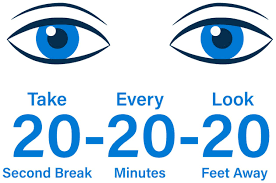
One effective way to prevent digital eye strain is to follow the 20-20-20 rule. This means that every 20 minutes, you should take a break from your computer screen and look at something 20 feet away for 20 seconds. This allows your eyes to relax and refocus, reducing the strain on your eyes.
Other tips for preventing digital eye strain throughout the day include:
- Adjusting the brightness and contrast of your screen to reduce glare and make the text easier to read.
- Positioning your screen so that it is slightly below eye level and about an arm’s length away from your face.
- Using a document holder to keep your work at the same distance and angle as your screen.
- Blinking more frequently to keep your eyes moist.
- Taking frequent breaks and doing eye exercises to reduce eye strain from digital screens and improve focus.
Adjusting Screen Settings
Adjusting your screen settings can be an effective way to prevent digital eye strain. Here are some tips to consider:
- Brightness: Adjust the brightness of your screen to a comfortable level. Avoid having your screen too bright, as it can cause eye strain, and also avoid having it too dim, as it can make it difficult to see the content.
- Contrast: Adjust the contrast so that the text on the screen is clear and easy to read. This can reduce eye strain and fatigue.
- Text Size: Increase the text size to reduce eye strain when reading. This can also make it easier to read text on your screen.
- Color Temperature: Adjust the color temperature of your screen to reduce eye strain. Blue light can cause eye strain, so consider using a warmer color temperature or using a blue light filter to reduce the amount of blue light emitted from your screen.
- Font Type: Choose a font type that is easy to read and avoid using small, fancy, or italicized fonts, as they can strain your eyes.

Proper Workspace Ergonomics
Ensure your workspace is ergonomically designed, with a comfortable chair that supports good posture. Your feet should be flat on the floor, and your elbows should be at a 90-degree angle when typing.
- Desk Height: Adjust your desk height so that your monitor is at or slightly below eye level. This can help reduce neck and eye strain.
- Distance: Position your monitor about arm’s length away from your eyes. This can help reduce eye strain from digital screens and fatigue.
- Lighting: Position your monitor away from windows and sources of bright light to avoid glare. Use task lighting to illuminate your workspace.
- Chair Height: Adjust your chair height so your feet are flat on the ground and your knees are level with your hips. This can help reduce back and leg strain.

Blink More Often
Blinking helps to keep your eyes moist and reduces dryness. Make a conscious effort to blink more often when using digital devices.

Using Computer Glasses
Consider investing in computer glasses, which have specially designed lenses to help reduce eye strain from digital screens. They often come with a slight tint or an anti-reflective coating that minimizes glare.

Monitor Position and Distance
Place your screen at a comfortable distance, ideally at arm’s length, and position the digital device with the top of the screen at or slightly below eye level.

Reducing Glare and Reflection
Position your screen to avoid glare from windows or overhead lights. You can also use an anti-glare screen protector.

Regular Eye Exams
Maintaining regular eye exams can help detect vision problems early and ensure you have the correct prescription for your glasses or contact lenses.

Taking Frequent Breaks
Incorporate regular breaks into your work routine to give your eyes a chance to rest. Stand up, stretch your eyes during a breakout, and move around during these breaks to improve overall well-being.
Apps and Tools for Reducing Eye Strain
There are several apps and tools available to help you manage digital eye strain. Some popular options include:
- F.lux: Adjusts your screen’s color temperature according to the time of day, reducing blue light exposure.
- Time Out: Reminds you to take regular breaks, following the 20-20-20 rule.
- Dark Reader: Enables a dark mode for websites, reducing eye strain during extended browsing sessions.
Exercises to Relieve Eye Strain
Here are some exercises that can help to relieve eye strain:
- Palming: Rub your palms together to generate heat, and then place your palms over your closed eyes for 1-2 minutes.
- Blinking: Blink rapidly for a few seconds to help lubricate your eyes.
- Eye rolling: Roll your eyes in a circular motion, clockwise and counterclockwise.
- Focus shifting: Focus on a distant object for a few seconds, and then shift your focus to something closer.
Conclusion
Eye strain from digital screens can be a common problem for those who spend a lot of time in front of computer screens. However, by following these tips and tricks, you can reduce eye strain from digital screens and protect your eyes from the harmful effects of screens. Remember to take regular breaks, adjust your screen settings, and practice good eye hygiene to keep your eyes healthy.
Digital eye strain is a common problem in today’s technology-driven world, but it can be managed with the right strategies. By using eye-healthy habits and following the tips in this article, you can reduce eye strain from digital screens and maintain good eye health while continuing to enjoy your digital devices.
FAQs
Is blue light the main cause of digital eye strain?
While blue light exposure can contribute to digital eye strain, it is not the sole cause. Factors such as screen glare, ambient lighting, improper viewing distances, and poor ergonomics also play a significant role.
Can digital eye strain cause permanent damage to my eyes?
Digital eye strain does not typically cause permanent damage, but it can lead to discomfort and reduced productivity. Taking steps to reduce or avoid digital eye strain can improve your overall quality of life.
Is it better to use a larger screen to prevent digital eye strain?
A larger screen can reduce eye strain from digital screens by allowing you to view content more comfortably. However, it’s essential to maintain proper viewing distance and position to maximize the benefits.
Can I adjust the brightness of my screen to reduce eye strain?
Yes, adjusting the brightness of your screen can help to reduce eye strain from digital screens. Set the screen brightness to a comfortable level that is not too bright or too dim.
Are there any other exercises to relieve eye strain?
Yes, there are several exercises that can help to relieve eye strain, including palming, blinking, eye-rolling, and focus shifting.
Thank you for reading and make sure you reduce your eye strain from digital screens!